Better Tooltip
BetterTooltip Attribute
The BetterTooltip attribute enhances the functionality of the standard Tooltip attribute in Unity by providing a visual indicator to indicate the presence of a tooltip in the inspector. This can help improve the clarity and accessibility of tooltips for your serialized fields.
Why use BetterTooltip?
The standard Tooltip attribute in Unity does not provide a visual indicator to show whether a tooltip is present or not. With the BetterTooltip attribute, an icon is always displayed next to fields that have a tooltip, making it easier for developers to identify and utilize tooltips in the inspector.
How to use BetterTooltip
To use the BetterTooltip attribute, follow the steps below:
- Attach the BetterTooltip attribute to the desired serialized field.
- Provide the tooltip text as a parameter within the attribute.
Here's an example of how to use the BetterTooltip attribute:
[BetterTooltip("Some tooltip about some value")]
[SerializeField] private float someValue;
In the inspector, a tooltip icon will be displayed next to the field, indicating the presence of the tooltip.
Result
The usage of the BetterTooltip attribute produces the following result in the inspector:
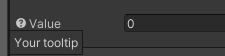
The tooltip icon next to the serialized field indicates that a tooltip is available. Hovering over the icon will display the tooltip text, providing additional information or context about the field.