Script Templates
Those Scripts are here to help you faster create scripts/classes within Unity.
This also shows how they look and can be created on their own.
Adjust those Scripts to your liking and what works best for you.
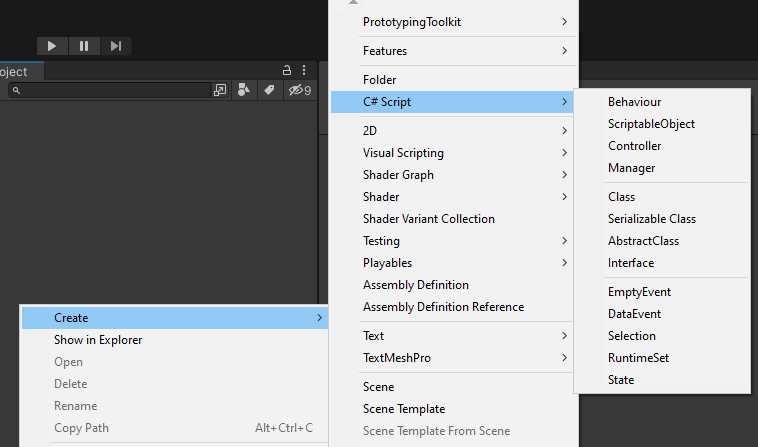
| Category | Class | Description |
|---|---|---|
| Unity Scripts | Behaviour | Base class for script components attached to GameObjects. |
| ScriptableObject | Base class for creating assets with serialized data. | |
| Controller | Class that handles input and controls game behavior. | |
| Manager | Class that manages specific game systems or functionalities. | |
| Classes | Class | Basic unit of code organization. |
| Serializable Class | Class that can be serialized and stored in various formats. | |
| Abstract Class | Class that cannot be instantiated but serves as a base for others. | |
| Interface | Contract that defines a set of methods and properties. | |
| Toolkit Classes | Empty Event | Event without any specific data payload. |
| Data Event | Event with a specific data payload. | |
| Selection | Class that handles selection of objects. | |
| Runtime Set | Collection of objects that can be dynamically modified at runtime. | |
| State | Class that represents a specific state in a state machine. | |
| StateMachine | Monobehaviour that represents a StateMachine. |
After creating one of those Scripts:
- adjust Namespace
- adjust menuName or fileName if its a ScriptableObject
- adjust fields
- remove unused methods
Example for ScriptableObject:
using UnityEngine;

namespace Logic
{
   [CreateAssetMenu(
   fileName = "newSomeData",
   menuName = "Features/FeatureA/SomeData")]
   public class SomeData : ScriptableObject
   {
      [Header("Data")]
      [SerializeField] private ScriptableObject data;

      public ScriptableObject Data => data;

      private void OnEnable()
      {

      }

      private void OnDisable()
      {

      }
   }
}