State Logic
The state logic allows you to create state-driven behavior in your application. By deriving from the StateMachine class and implementing custom state classes derived from BaseState, you can control the flow and execution of different states based on events or inputs.
A Class can derive from StateMachine in order to be state driven and decides whether
a State is changed or not based on Events or Inputs and communicates it to
the StateMachine and if it does it provides a new State (Object derived from BaseState).
Those Objects have to be created on its own based on the available states and must implement BaseState!
1. Create a new State
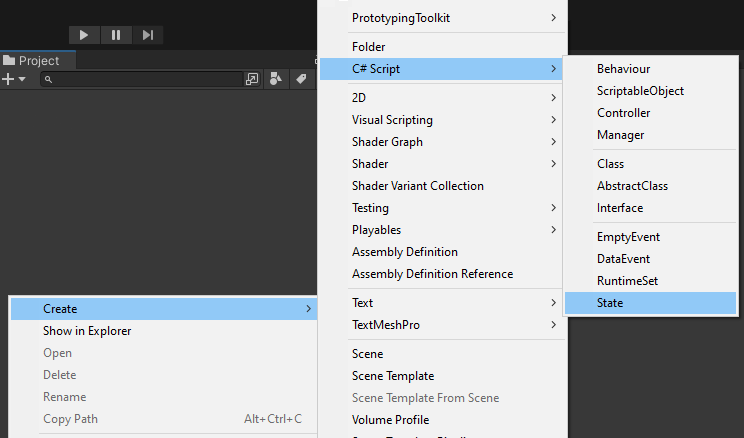
2. Adjust the State Class
- Adjust namespace
- Adjust
HasNextState()and define what are valid next states - Fill
OnEnter(),OnExecute(),OnFixedExecute()andOnExit()with your logic or remove then when not needed - Create fields and set them in the Constructor and add them as parameters
namespace Logic
{
    public class SomeState : BaseState
    {
        public SomeState()
        {
        }

        protected override void OnEnter()
        {
           // add logic here
        }

        internal override void Execute()
        {
           // add logic here
        }

        internal override void FixedExecute()
        {
           // add logic here
        }

        protected override void OnExit()
        {
           // add logic here
        }

        public override bool HasNextState(BaseState nextState)
        {
            // return nextState.GetType() == typeof(SomeState);
            return false;
        }
    }
}
3. Create a new StateMachine
- Make any Class and let it derive from StateMachine instead of Monobehaviour
- Add states as fields
- Use
TransitionTowith a State as parameter when needed
namespace Logic
{
    public class SomeStateMachine : StateMachine
    {
        private SomeState someState;
        private SomeOtherState someOtherState;

        private void Awake()
        {
            someState = new SomeState();
            someOtherState = new SomeOtherState();

            Initialize(someState);
        }

        private void ChangeStateTo(BaseState state)
        {
            if (currentStateSO.currentState is not state)
            {
                TransitionTo(state);
            }
        }
    }
}
You can also use the Script Templates for States and StateMachine.