Selection
The RuntimeSet is a versatile class that allows you to ...
1. Create your own Selection Class
To create your own Selection script, follow these steps:
- In the Unity Editor, right-click in the Project window or within a desired folder.
- Select "Create" and navigate to "C# Scripts/Selection" to create a new Selection script.
- Provide a meaningful name for your Selection
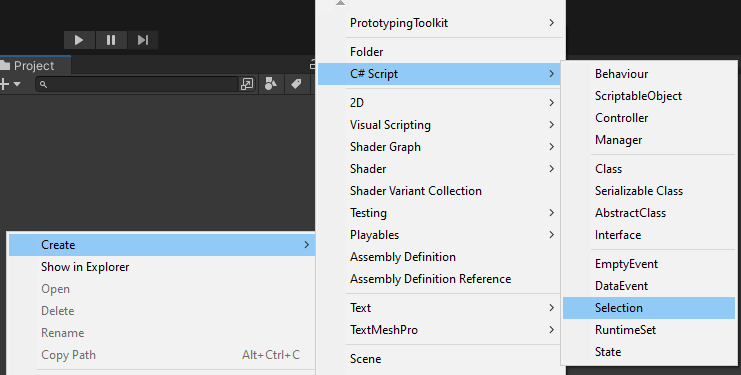
2. Adjust the class
Make sure to adjust the namespace, menu name, and filename to match your project's structure and naming conventions.
Also, replace Something with the actual type you want to store in the Selection.
namespace Logic
{
   [CreateAssetMenu(
   fileName = "newSomeSelection",
   menuName = "FEATURENAME/SomeSelection")]
   public class SomeSelection : Selection<Something> {    }
}
3. Create your Selection Asset
To create your own Selection asset, follow these steps:
- In the Unity Editor, right-click in the Project window or within a desired folder.
- Select "Create" and navigate to "FEATURENAME/Selection" to create a new Selection asset.
- Provide a meaningful name for your Selection
4. How to use the Selection
- Reference the Selection
- Set a Selection
public class Something : MonoBehaviour
{
    [SerializeField] private SomeSelection someSelection;

    private void OnClick()
    {
        someSelection.Set(this);
    }
}
5. Use the Selection
- Reference the Selection
- Get a Selection
public class SomeBehaviour : MonoBehaviour
{
    [SerializeField] private SomeSelectionChangedEvent someSelectionEvent;

    private void OnEnable()
    {
       someSelectionEvent.Register(OnSelectionChanged);
    }

    private void OnDisable()
    {
       someSelectionEvent.Unregister(OnSelectionChanged);
    }

    private void OnSelectionChanged()
    {
        Something something = someSelection.Get();
        if (something != null)
        {
        // Add Logic here
        }
    }
}
API
The following public methods are available for working with selections:
| Public Methods | Description | Parameter |
|---|---|---|
| OnCurrentChanged | Getter/setter for the callback event raised when the selection is changed. | - |
| Get | Retrieves the current object of the selection. | - |
| Set | Sets the current object of the selection. | T value |
| Restore | Sets the current object of the selection to its default. | - |