Audio Manager
The Audio Manger will listen to Play_AdioEvents and Stop_AdioEvents from the Audio Data in order to play them with the corresponding Audio Event Data send with it.
Quick Setup
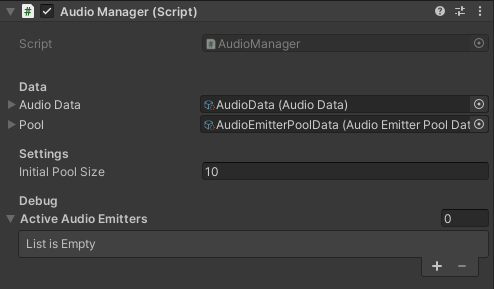
- Drag and drop the AudioManager Prefab into your Scene and set it up
- Check if AudioData and AudioEmitterPoolData are referenced
- Choose your initial Pool size
- In the Debug Area can be seen which AudioEmitter are currently used
- Now you are ready to raise Audio Events and send Audio Event Data with it and the Audio Manager will play the Audio Clip