Runtime Set
The RuntimeSet is a versatile class that allows you to create and manage collections of items at runtime. It provides methods for adding and removing items, as well as accessing the items for further processing.
1. Create your own RuntimeSet Class
To create your own RuntimeSet script, follow these steps:
- In the Unity Editor, right-click in the Project window or within a desired folder.
- Select "Create" and navigate to "C# Scripts/RuntimeSet" to create a new RuntimeSet script.
- Provide a meaningful name for your RuntimeSet
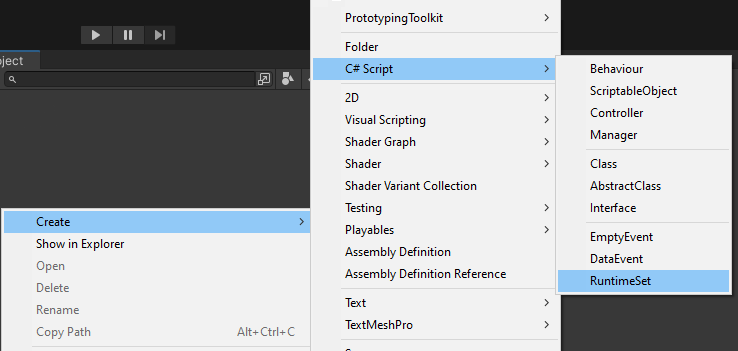
2. Adjust the class
Make sure to adjust the namespace, menu name, and filename to match your project's structure and naming conventions.
Also, replace Something with the actual type you want to store in the RuntimeSet.
using UnityEngine;
using PrototypingToolkit.Core.Logic.RuntimeSet;

namespace Logic
{
   [CreateAssetMenu(
   fileName = "SomerunetimeSet",
   menuName = "FEATURENAME/SomerunetimeSet")]
   public class SomeRunetimeSet : RuntimeSet<Something> { }
}
3. Create your RuntimeSet Asset
To create your own RuntimeSet asset, follow these steps:
- In the Unity Editor, right-click in the Project window or within a desired folder.
- Select "Create" and navigate to "FEATURENAME/RuntimeSet" to create a new RuntimeSet asset.
- Provide a meaningful name for your RuntimeSet
4. How to use the RuntimeSet
- Reference the RuntimeSet
- Let Items add themselves OnEnable
- Let Items remove themselves OnDisable or OnDestroy based on your needs
public class SomeClass
{
    [SerializeField] private SomeRuntimeSet someRuntimeSet;

    private void OnEnable()
    {
       someRuntimeSet.Add(this);
    }

    private void OnDisable()
    {
       someRuntimeSet.Remove(this);
    }

    private void OnDestroy()
    {
       someRuntimeSet.Remove(this);
    }
}
5. Do something with the RuntimeSet Items
To perform operations on the items stored in the RuntimeSet, follow these steps:
- Reference the RuntimeSet in the script where you want to use the items.
- Use the
GetItemsmethod to retrieve the collection of items from the RuntimeSet. - Iterate through the items and perform the desired logic.
[SerializeField] private SomeRuntimeSet someRuntimeSet;

private void DoSomething()
{
    foreach (Something something in someRuntimeSet.GetItems())
    {
       // Add Logic here
    }
}