Audio Events & Audio Event Data
Audio Event Data is a SOs that holds audio clip(s) and corresponding settings.
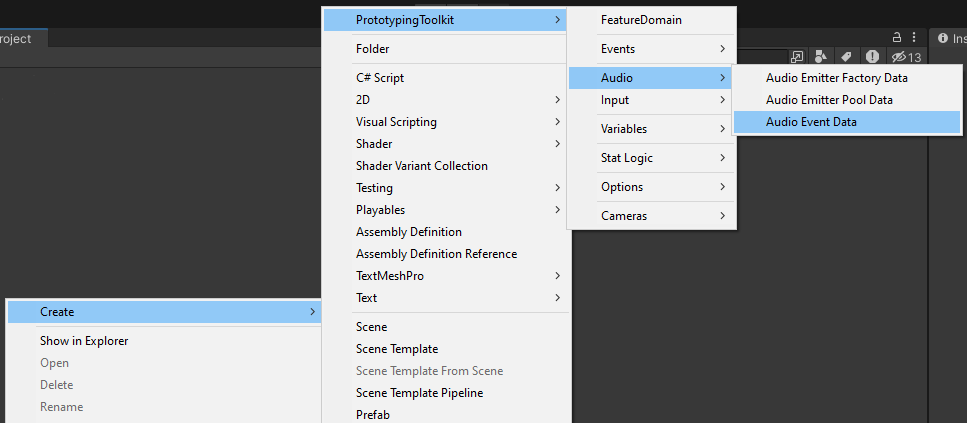
1. Create an Audio Event Data
- Open the Create Asset Menu and Choose Audio Event Data or copy an existing one
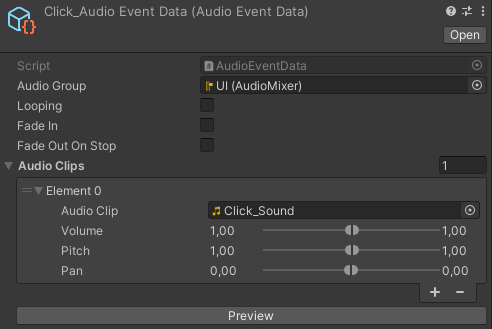
2. Setup
- Choose the corresponding Audio Mixer Group
- Choose if it Loops Fades in oder Fades out
- Add Audio Clips and adjust
- If multiple Clips are added Random Clips will be chosen on play
- Volume Pitch and Pan (If min and max are set Random Values will be chosen on play)
- Preview if needed
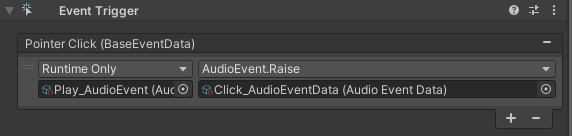
3b. Raise Audio Events via Inspector
- Reference it in a Unity Event in the Inspector
3b. Raise Audio Events via Code
- Reference the Audio Data or the Play AudioEvent and the Stop AudioEvent in your script
- (Hints:
- Referencing the Audio Data makes it easier to debug who uses the Play AudioEvent
- It is also possible to create own Audio Events: Create your own typed DataEvent)
- (Hints:
- And connect it to your logic
[Header("Data")]
[SerializeField] private AudioData audioData;

[SerializeField] private AudioEventData someAudio;

private void PlaySomeAudio()
{
   audioData.PlayAudioEvent.Raise(someAudio);
}
or
[Header("Data")]
[SerializeField] private AudioEvent playAudioEvent;
[SerializeField] private AudioEvent stopAudioEvent;

[SerializeField] private AudioEventData someAudio;

private void PlaySomeAudio()
{
   playAudioEvent.Raise(someAudio);
}

private void StopSomeAudio()
{
   stopAudioEvent.Raise(someAudio);
}